One of the reasons a lot of us work in this industry is because we like to solve problems. We sure aren't in it for the money and fame ;). But how often do you see things suggested or even implemented that indicate a lack of understanding of the real problem?
For example, take the new scalability limits in vSphere 4.1. You can have up to 10,000 VM's managed by a single vCenter - WOW! By why do people actually ask for this? I highly doubt the people who asked for such scalability have licensing concerns - they're likely on a licensing tier that doesn't cost them anymore if they have 1 or 100 vCenter servers. Similarly, removing the need to deploy more hardware is probably a minimal concern - I'm sure a lot of those same people don't even run vCenter on physical hardware anymore. I'm willing to bet the number one reason people asked for higher limits in vCenter was operationally / support driven. But what problem does a single massive vCenter actually address, and what problems does it introduce?
Having a single vCenter means you have a single place to go for provisioning, inventory and monitoring. And that's good, because you don't have to think about it when you need to do one of those things, right? But should you really be hitting vCenter directly for any of those things? I would say not. Your provisioning process should be automated, using some kind of placement engine to determine which vCenter / vDC / Cluster / Datastore / vNetwork to put that next VM on. Your inventory data should be in a CMDB. You should be using some kind of aggregator or at the very least push notifications for monitoring (as opposed to a human "poll").
The problems of a single massive vCenter are obvious - a huge single point of failure, a beefy database, and a nightmare if you ever need to troll through some logs.
So while increasing the scalability of vCenter was the easiest thing VMware could do for customers, it's not really the best thing that customers can do for themselves. Give me multiple small vCenters and decoupled operational tools any day!
Showing posts with label VMware. Show all posts
Showing posts with label VMware. Show all posts
Monday, 14 February 2011
Wednesday, 7 January 2009
VMware 2009 Product Lineup
I was under the impression that some of these products were still in super secret squirrel status, but as they're now appearing on the VMware Products homepage, I guess that's no longer the case!

Since you're all going to go and check out the VMware spiel anyways, I won't bother repeating it here.
What I will say though is that I'm not sure how wise it is for VMware to simultaneously spread themselves even thinner by releasing more products, and eat into the opportunities for ISV's. 2009 is going to be a tough year for everyone, and a healthy ISV market is good for a software company. The last thing VMware should be doing is try and offer everything themselves, thus driving ISV's like Veeam, Quest and the many others into Microsoft's camp where they will no doubt be welcomed with open arms!

Since you're all going to go and check out the VMware spiel anyways, I won't bother repeating it here.
What I will say though is that I'm not sure how wise it is for VMware to simultaneously spread themselves even thinner by releasing more products, and eat into the opportunities for ISV's. 2009 is going to be a tough year for everyone, and a healthy ISV market is good for a software company. The last thing VMware should be doing is try and offer everything themselves, thus driving ISV's like Veeam, Quest and the many others into Microsoft's camp where they will no doubt be welcomed with open arms!
Thursday, 1 January 2009
Deploying OVF's with the VMware OVF Tool
I finally got around to OVF'ing a Windows XP build. Although I have an unattended setup XP .iso which makes building XP VM's hassle free and pretty fast, it's obviously nowhere near as hassle free and fast as deploying from OVF!
Although you can import OVF's with VMware Workstation, it's a bit cumbersome. I've also had some wierd experiences with it, such as the "split disk into 2GB files" option being ticked and greyed out when I didn't want the option selected (both for export and import operations). VMware Player is no better, as you can't control where the OVF is deployed to. Back when we were developing statelesx, we used a Java based version of the OVF Tool from VMware to create the virtual appliance package. But someone at VMware has been quietly beavering away (I say quietly because I haven't seen _any_ publicity from VMware about this tool), and it's now at a 1.0.0 build (although still labelled as a "technology preview").
And just like Boche, they've injected some steroids into the tool... for example (note I haven't tried this... yet) you could pull an OVF straight off a webserver and plonk it onto a host, specifying datastore and portgroup details with:
ovfTool "http://my_ovf_server/ovfs/myAppliance.ovf" "vi://username:pass@my_vc_server/my_datacenter/host/my_host&datastore=my_datastore&net:ovf_network_name=vc_network_name"
So check it out, it's a nice and fast way to deploy OVF's locally for use with Workstation or Player, but also has some serious enterprise functionality.
Although you can import OVF's with VMware Workstation, it's a bit cumbersome. I've also had some wierd experiences with it, such as the "split disk into 2GB files" option being ticked and greyed out when I didn't want the option selected (both for export and import operations). VMware Player is no better, as you can't control where the OVF is deployed to. Back when we were developing statelesx, we used a Java based version of the OVF Tool from VMware to create the virtual appliance package. But someone at VMware has been quietly beavering away (I say quietly because I haven't seen _any_ publicity from VMware about this tool), and it's now at a 1.0.0 build (although still labelled as a "technology preview").
And just like Boche, they've injected some steroids into the tool... for example (note I haven't tried this... yet) you could pull an OVF straight off a webserver and plonk it onto a host, specifying datastore and portgroup details with:
ovfTool "http://my_ovf_server/ovfs/myAppliance.ovf" "vi://username:pass@my_vc_server/my_datacenter/host/my_host&datastore=my_datastore&net:ovf_network_name=vc_network_name"
So check it out, it's a nice and fast way to deploy OVF's locally for use with Workstation or Player, but also has some serious enterprise functionality.
Wednesday, 10 December 2008
ESXi 3 Update 3 - Free Version Unshackled, hoo-rah!
I'm not going to try and claim credit for this development, but Rich Brambley (the only blog with a description that I feel outshines my own :-) broke the news today that the free version ESXi 3 Update 3 appears to have a fully functional API. I plan on testing this out tomorrow, and will report back as I'm sure others will too!
UPDATE The great Mike D has beaten me to it. Looks like all systems are go for the evolution of statelesx... ;-)
UPDATE 2 Oh man... who the !#$% is running QA in VMware? What a shocker!
UPDATE The great Mike D has beaten me to it. Looks like all systems are go for the evolution of statelesx... ;-)
UPDATE 2 Oh man... who the !#$% is running QA in VMware? What a shocker!
VMware View - Linked Clones Not A Panacea for VDI Storage Pain!
Why do I always seem to be the bad guy. I know the other guys dont gloss over the limitations or realities of product features on purpose, but sheesh it always seems to be me cutting a swathe of destruction through the marketing hype. Somehow I don't think I will be in contention for VVP status anytime soon (I'm sure the profanity doesn't help either but... fuck it. Hey it's not like kids read this, and I'm certainly not out there doing this kind of thing).
As any reader of this blog will be aware, VMware View was launched a week or so ago. Amongst it's many touted features was the oft requested "linked clone" functionality, designed to reduce the storage overheads associated with VDI. But it may not be the panacea it's being made out to be.
My 2 main concerns are:
1) Snapshots can grow up to the same size as the source disk. Although this situation will probably not be too common, you can bet your life that they will grow to the size of the free space in the base image in a manner of weeks. I've spent an _extensive_ amount of time testing this stuff out to try and battle the VDI storage cost problem. But no matter how much you tune the guest OS, there's just no way to overcome the fact that the NTFS filesystem will _always_ write to available zero'ed blocks before it writes to blocks containing deleted files. This means if you have 10GB free space, and you create and delete a 1GB file 10 times, you will end up with no net change in used storage within the guest however your snapshot will now be 10GB in size. Don't belive me? Try it yourself. Now users creating and deleting large files in this manner may again be uncommon, but temporary internet files, software distribution / patching application caches, patch uninstall directories, AV caches and definition files, temporary office files... these things all add up. Fast. Now of course each environment will differ in this regard, so the best thing you can do to get an idea of what the storage savings you can expect is take a fresh VDI machine, snapshot it, and then use it normally for a month. Of if you think you're not the average user, pick a newly provisioned user VDI machine and do the test. Monitor the growth of that snap file weekly. I think you'll be surprised at what you find. Linked clones are just snapshots at the end of the day, they don't do anything tricky with deduplication, they don't do anything tricky in the guest filesystem, they are just snapshots. Which leads me to my next major concern.
2) LUN locking. We all know that a lock is acquired on a VMFS volume whenever volume metadata is updated. Metadata updates occur everytime a snapshot file is incremented, at the moment this is hardcoded to 16MB increments. For this reason, the recommendation from VMware has always been to minimise the number of snapshotted machines on a single LUN. Something like 8 per LUN I think was the ballpark maximum. Now if the whole point of linked clones is to reduce storage, it's fair to assume you'd be planning to increase the number of VM's per LUN, not decrease them. In which case houston, we may have a problem. Perhaps linked clones increment in blocks of greater than 16MB, which may go some way towards solving the problem. But at this time I don't know if that's the case or not. Someone feel free to check this out and let me know (Rod, I'm looking at you :-)
Now of course there are many other design considerations, such having a single small LUN for the master image and partitioning your array cache so that LUN is _always_ cached. It's a snap'ed vmdk and therefore read only so this won't be a problem. Unless you dont have enough array cache to do this (which will likely be the case outside of large enterprises, or even within them in some cases).
In my mind, the real panacea for the storage problem is statelessness. User environment virtualisation / streaming and app virtualisation / streaming are going to make the biggest dent in the storage footprint, while at the same time allowing us to use much cheaper storage because when the machine state is empty until a user logs on, it doesn't matter so much if the storage containing 50 base VM images disappears (assuming you catered for this scenario, which you did because you know that cheaper disk normally means increased failure rate).
So by all means, check View out. If high latency isn't a problem for you, there's little reason to choose another broker (aside from cost of course). But don't offset the cost of the broker with promises of massive storage cost reduction without trying out my snap experiment in your environment first, or you may get burnt.
UPDATE Rod has a great post detailing his thoughts on this. Go read it!
UPDATE 2 Another excellent post on this topic from the man himself, Chad Sakac. Chad removes any fears regarding LUN locking, which IMHO is only possible with empricial testing, which is exactly what Chad and his team have done. Excellent work, and thankyou. With regards to my other concern of snapshot growth and the reality of regular snapshot reversion, he also clarifies the absolutely vital point in all of this, which I didn't do a very good job of in my initial post - every environment will differ. Although I still believe the place I work is fairly typical of any large enterprise at this point in time, the absolute best thing for you to do in your shop is test it and see what the business are willing to except in terms of rebuiilds or investment in other technologies such as app virtualisation and profile management. They may or may not offset any storage cost reductions, again every place will differ.
As any reader of this blog will be aware, VMware View was launched a week or so ago. Amongst it's many touted features was the oft requested "linked clone" functionality, designed to reduce the storage overheads associated with VDI. But it may not be the panacea it's being made out to be.
My 2 main concerns are:
1) Snapshots can grow up to the same size as the source disk. Although this situation will probably not be too common, you can bet your life that they will grow to the size of the free space in the base image in a manner of weeks. I've spent an _extensive_ amount of time testing this stuff out to try and battle the VDI storage cost problem. But no matter how much you tune the guest OS, there's just no way to overcome the fact that the NTFS filesystem will _always_ write to available zero'ed blocks before it writes to blocks containing deleted files. This means if you have 10GB free space, and you create and delete a 1GB file 10 times, you will end up with no net change in used storage within the guest however your snapshot will now be 10GB in size. Don't belive me? Try it yourself. Now users creating and deleting large files in this manner may again be uncommon, but temporary internet files, software distribution / patching application caches, patch uninstall directories, AV caches and definition files, temporary office files... these things all add up. Fast. Now of course each environment will differ in this regard, so the best thing you can do to get an idea of what the storage savings you can expect is take a fresh VDI machine, snapshot it, and then use it normally for a month. Of if you think you're not the average user, pick a newly provisioned user VDI machine and do the test. Monitor the growth of that snap file weekly. I think you'll be surprised at what you find. Linked clones are just snapshots at the end of the day, they don't do anything tricky with deduplication, they don't do anything tricky in the guest filesystem, they are just snapshots. Which leads me to my next major concern.
2) LUN locking. We all know that a lock is acquired on a VMFS volume whenever volume metadata is updated. Metadata updates occur everytime a snapshot file is incremented, at the moment this is hardcoded to 16MB increments. For this reason, the recommendation from VMware has always been to minimise the number of snapshotted machines on a single LUN. Something like 8 per LUN I think was the ballpark maximum. Now if the whole point of linked clones is to reduce storage, it's fair to assume you'd be planning to increase the number of VM's per LUN, not decrease them. In which case houston, we may have a problem. Perhaps linked clones increment in blocks of greater than 16MB, which may go some way towards solving the problem. But at this time I don't know if that's the case or not. Someone feel free to check this out and let me know (Rod, I'm looking at you :-)
Now of course there are many other design considerations, such having a single small LUN for the master image and partitioning your array cache so that LUN is _always_ cached. It's a snap'ed vmdk and therefore read only so this won't be a problem. Unless you dont have enough array cache to do this (which will likely be the case outside of large enterprises, or even within them in some cases).
In my mind, the real panacea for the storage problem is statelessness. User environment virtualisation / streaming and app virtualisation / streaming are going to make the biggest dent in the storage footprint, while at the same time allowing us to use much cheaper storage because when the machine state is empty until a user logs on, it doesn't matter so much if the storage containing 50 base VM images disappears (assuming you catered for this scenario, which you did because you know that cheaper disk normally means increased failure rate).
So by all means, check View out. If high latency isn't a problem for you, there's little reason to choose another broker (aside from cost of course). But don't offset the cost of the broker with promises of massive storage cost reduction without trying out my snap experiment in your environment first, or you may get burnt.
UPDATE Rod has a great post detailing his thoughts on this. Go read it!
UPDATE 2 Another excellent post on this topic from the man himself, Chad Sakac. Chad removes any fears regarding LUN locking, which IMHO is only possible with empricial testing, which is exactly what Chad and his team have done. Excellent work, and thankyou. With regards to my other concern of snapshot growth and the reality of regular snapshot reversion, he also clarifies the absolutely vital point in all of this, which I didn't do a very good job of in my initial post - every environment will differ. Although I still believe the place I work is fairly typical of any large enterprise at this point in time, the absolute best thing for you to do in your shop is test it and see what the business are willing to except in terms of rebuiilds or investment in other technologies such as app virtualisation and profile management. They may or may not offset any storage cost reductions, again every place will differ.
Thursday, 4 December 2008
ThinApp Blog - would you like a glass of water to help swallow that foot?
I'm going to try and resist the urge to make this post another 'effenheimer' (as Mr Boche might say :-) but my mind boggles as to WTF the ThinApp team were thinking when they made this post. Way to call out a major shortcoming of your own product guys! To be honest, I'm completely amazed that VMware don't support their own client as a ThinApp Package. Say what you will about Microsoft, but you gotta respect their 'eat our own dogfood' mentality. To my knowledge, if you encounter an issue with any Microsoft client based app that is delivered via App-V, they will support you to the hilt.
Now that i've passed the Planet v12n summary wordcount, I can give in to my temptation and start dropping the F bombs, because I'm mad. The VI client is a fairly typical .NET based app. If VMware themselves don't support ThinApp'ing it, how the fuck do they expect other ISV's with .NET based products to support ThinApp'ing their apps? Imagine if VMware said that running vCenter in a guest wasn't supported - what kind of message would that send about machine virtualisation! Adding to the embarrassment, it seems that ThinApp'ing the .NET Framework itself is no dramas!!!
It's laughable that a company would spend so much time and money on marketing efforts like renaming products mid-lifecycle, but let stuff like this slip by the wayside. Let's hope this is fixed for the next version of VI.
Now that i've passed the Planet v12n summary wordcount, I can give in to my temptation and start dropping the F bombs, because I'm mad. The VI client is a fairly typical .NET based app. If VMware themselves don't support ThinApp'ing it, how the fuck do they expect other ISV's with .NET based products to support ThinApp'ing their apps? Imagine if VMware said that running vCenter in a guest wasn't supported - what kind of message would that send about machine virtualisation! Adding to the embarrassment, it seems that ThinApp'ing the .NET Framework itself is no dramas!!!
It's laughable that a company would spend so much time and money on marketing efforts like renaming products mid-lifecycle, but let stuff like this slip by the wayside. Let's hope this is fixed for the next version of VI.
Wednesday, 3 December 2008
HA Slot Size Calculations in the Absence of Resource Reservations
Ahhh, the ol' HA slot size calculations. Many a post has been written, many a document published that tried to explain just how HA slot sizes are calculated. But the one thing missing from most of these, certainly from the VMware documentation, is what behaviour can be expected when there are no resource reservations on an individual VM. For example in many large scale VDI deployments that I know of, share based resource pools are used to assert VM priority rather than resource reservations being set per-VM.
So here's the rub.
In the absence of any VM resource reservations, HA calculates the slot size based on a _minimum_ of 256MHz CPU and 256MB RAM. The RAM amount varies however, not by something intelligent like average guest memory allocation or average guest memory usage, but by the table on page 136 / 137 of the resource management guide, which is the memory overhead associated with guests depending on how much allocated memory the guest has, how many vCPU's the guest has, and what the vCPU architecture is. So lets be straight on this. If 256MB > 'VM memory overhead', then 256MB is what HA uses for the slot size calculation. If 'VM memory overhead' > 256MB, then 'VM memory overhead' is what is used for the slot size calculation.
So for example, a cluster full of single vCPU 32bit Windows XP VM's will have the default HA slot size of 256MHz / 256MB RAM in the absence of any VM resource reservations. Net result? A cluster of 8 identical hosts, each with 21GHz CPU and 32GB RAM, and HA configured for 1 host failure, will result in HA thinking it can safely run something like 7 x (21GHz / 256MHz) guests in the cluster!!!
Which led to a situation I came across recently whereby HA thought it still had 4 hosts worth of failover capacity in an 8 host cluster with over 300 VM's running on it, even though the average cluster memory utilisation was close to 90%. Clearly, a single host failure would impact this cluster, let alone 4 host failures. 80-90% resource utilisation in the cluster is a pretty sweet spot imho, the question is simply do you want that kind of utilisation under normal operating conditions, or under failure conditions. As an architect, I should not be making that call - the business owners of the platform should be making that call. In these dark financial times, I'm sure you can guess what they'll opt for. But the bottom line is the business signs off on the risk acceptance - not me, and certainly not the support organisation. But I digress...
I hope HA can become more intelligent in how it calculates slot sizes in the future. Giving us the das.vmMemoryMinMB and das.vmCpuMinMHz advanced HA settings in vCenter 2.5 was a start, something more fluid would be most welcome.
PS. I'd like to thank a certain VMware TAM who is assigned to the account of a certain tier 1 global investment bank that employs a certain blogger, for helping to shed light on this information. You know who you are ;-)
So here's the rub.
In the absence of any VM resource reservations, HA calculates the slot size based on a _minimum_ of 256MHz CPU and 256MB RAM. The RAM amount varies however, not by something intelligent like average guest memory allocation or average guest memory usage, but by the table on page 136 / 137 of the resource management guide, which is the memory overhead associated with guests depending on how much allocated memory the guest has, how many vCPU's the guest has, and what the vCPU architecture is. So lets be straight on this. If 256MB > 'VM memory overhead', then 256MB is what HA uses for the slot size calculation. If 'VM memory overhead' > 256MB, then 'VM memory overhead' is what is used for the slot size calculation.
So for example, a cluster full of single vCPU 32bit Windows XP VM's will have the default HA slot size of 256MHz / 256MB RAM in the absence of any VM resource reservations. Net result? A cluster of 8 identical hosts, each with 21GHz CPU and 32GB RAM, and HA configured for 1 host failure, will result in HA thinking it can safely run something like 7 x (21GHz / 256MHz) guests in the cluster!!!
Which led to a situation I came across recently whereby HA thought it still had 4 hosts worth of failover capacity in an 8 host cluster with over 300 VM's running on it, even though the average cluster memory utilisation was close to 90%. Clearly, a single host failure would impact this cluster, let alone 4 host failures. 80-90% resource utilisation in the cluster is a pretty sweet spot imho, the question is simply do you want that kind of utilisation under normal operating conditions, or under failure conditions. As an architect, I should not be making that call - the business owners of the platform should be making that call. In these dark financial times, I'm sure you can guess what they'll opt for. But the bottom line is the business signs off on the risk acceptance - not me, and certainly not the support organisation. But I digress...
I hope HA can become more intelligent in how it calculates slot sizes in the future. Giving us the das.vmMemoryMinMB and das.vmCpuMinMHz advanced HA settings in vCenter 2.5 was a start, something more fluid would be most welcome.
PS. I'd like to thank a certain VMware TAM who is assigned to the account of a certain tier 1 global investment bank that employs a certain blogger, for helping to shed light on this information. You know who you are ;-)
Thursday, 20 November 2008
Symantec reverts to normal, well done. And well done community!
Unfortunately I couldn't break the news when I heard it as I was at work (no way I'm blogging from there, my boss reads this - hi Mark :D), but Symantec has updated the original KB article to something much, much more reasonable (although it seems to be offline at the minute).
No company is immune from the odd premature / alarmist KB article, and however this happened doesn't matter as much as the outcome. I'm sure a lot was going on behind the scenes before I broke the news, but still I'd like to think we all played some part in getting it cleared up so quickly. Power to the people :-)
No company is immune from the odd premature / alarmist KB article, and however this happened doesn't matter as much as the outcome. I'm sure a lot was going on behind the scenes before I broke the news, but still I'd like to think we all played some part in getting it cleared up so quickly. Power to the people :-)
Tuesday, 18 November 2008
Symantec Does _NOT_ Support Vmotion... WTF!?!?!
Make sure you're sitting down before reading this Symantec KB article which is only 1 month old and clearly states they do _not_ support any current version of their product on ESX if Vmotion is enabled. No, it's not a joke.
It's a _fucking_ joke. Symantec have essentially pulled together a list of random issues that are almost certainly intermittent in nature and could have a near infinite number of causes, and somehow slapped the blame on Vmotion without as much as a single word of how they arrived at this conclusion. When Microsoft shut the AV vendors out of the Vista kernel, I actually felt a little sympathy for them (the AV vendors). But after reading this, I can't imagine the bullshit Microsoft must have had to put up with over the years. It's no wonder Microsoft tried to do their own thing with AV.
I urge every enterprise on the planet who are customers of both VMware and Symantec to rain fire and brimstone upon Symantec (I've already started), because your entire server and VDI infrastructure is at this time officially unsupported. The VMware vendor relationship team have already kicked into gear, we need to raise some serious hell as customers to drive this point home, and hard.
This is absolutely disgraceful and must not stand.
UPDATE The original KB article as been updated, support has been restored to normal!
It's a _fucking_ joke. Symantec have essentially pulled together a list of random issues that are almost certainly intermittent in nature and could have a near infinite number of causes, and somehow slapped the blame on Vmotion without as much as a single word of how they arrived at this conclusion. When Microsoft shut the AV vendors out of the Vista kernel, I actually felt a little sympathy for them (the AV vendors). But after reading this, I can't imagine the bullshit Microsoft must have had to put up with over the years. It's no wonder Microsoft tried to do their own thing with AV.
I urge every enterprise on the planet who are customers of both VMware and Symantec to rain fire and brimstone upon Symantec (I've already started), because your entire server and VDI infrastructure is at this time officially unsupported. The VMware vendor relationship team have already kicked into gear, we need to raise some serious hell as customers to drive this point home, and hard.
This is absolutely disgraceful and must not stand.
UPDATE The original KB article as been updated, support has been restored to normal!
Thursday, 30 October 2008
ESX 3.5 Update 3 Release Imminent!
It seems the ESX 3.5 Update 3 release is imminent, as per some recent updates to the VMware website (screeny below)
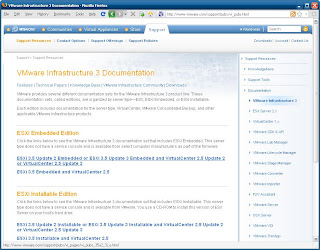
Wonder if we'll get any timebomb action this time :D

Wonder if we'll get any timebomb action this time :D
Thursday, 23 October 2008
VirtualCenter 2.5 Update 3 Upgrade Process - here we go again!
It seems the VirtualCenter upgrade process is not getting any better. I can't for the life of me understand how bugs like this got through with the Update 2 release, but they did and are one of the primary drivers for my company to roll out Update 3 asap (that and the security fixes). But lo, there are new upgrade problems afoot, notably this one which I have encountered 3 times now. Duncan called it out a few weeks back.
Now what really grinds my gears is that the most important fixes (for me anyway) are security related and of course the fix for the guest customisation bug. That is, binary patches - nothing at all to do with the database. In fact I can't find anything obviously database related in the release notes, and this is somewhat validated by the fact to get around this we need to append a "MINORDBUPGRADE=1" argument to VCDatabaseUpgrade.exe (the DSN, UID and PWD arguments don't appear to be necessary). So for anyone at VMware reading this, STOP TOUCHING THE VC DATABASE WHEN YOU DON'T HAVE TO. Minor DB upgrade? WTF? You're risking the VC database and ruining another persons saturday (now we need a Unix admin, a Windows admin _and_ a DBA to upgrade VC) for a MINOR UPGRADE?
Additionally, the jre binaries are not upgraded correctly as we found out when the Sun Ray environment in our lab broke after applying U3 (Sun have a KB article about this that I can't find at the moment). A clean install had no such problems however.
If VMware are going to continue with these monolithic style updates so frequently (Update 1 in April, Update 2 in July, and now Update 3 in October), they need to get their chi together. Tomcat and JRE security related bugs come out all the time, and if you work in a regulated environment then you have no choice but to patch ASAP. But having to touch the database in order to do so is the opposite of cool. Be cool VMware, be cool!
UPDATE: Here's that Sun KB article I was referring to... it actually mentions Update 2 but the same applies for Update 3
Now what really grinds my gears is that the most important fixes (for me anyway) are security related and of course the fix for the guest customisation bug. That is, binary patches - nothing at all to do with the database. In fact I can't find anything obviously database related in the release notes, and this is somewhat validated by the fact to get around this we need to append a "MINORDBUPGRADE=1" argument to VCDatabaseUpgrade.exe (the DSN, UID and PWD arguments don't appear to be necessary). So for anyone at VMware reading this, STOP TOUCHING THE VC DATABASE WHEN YOU DON'T HAVE TO. Minor DB upgrade? WTF? You're risking the VC database and ruining another persons saturday (now we need a Unix admin, a Windows admin _and_ a DBA to upgrade VC) for a MINOR UPGRADE?
Additionally, the jre binaries are not upgraded correctly as we found out when the Sun Ray environment in our lab broke after applying U3 (Sun have a KB article about this that I can't find at the moment). A clean install had no such problems however.
If VMware are going to continue with these monolithic style updates so frequently (Update 1 in April, Update 2 in July, and now Update 3 in October), they need to get their chi together. Tomcat and JRE security related bugs come out all the time, and if you work in a regulated environment then you have no choice but to patch ASAP. But having to touch the database in order to do so is the opposite of cool. Be cool VMware, be cool!
UPDATE: Here's that Sun KB article I was referring to... it actually mentions Update 2 but the same applies for Update 3
Tuesday, 14 October 2008
HP "Virtualization Blade" - Marketing Bullshit 1 / Virtualisation Architects 0
I'll start (as I often do with negatively titled posts) by saying that I love HP kit. No I'm not being sarcastic, back when I was a support guy I actually resigned from a place because they were going to switch their server vendor of choice away from HP. But for fucks sake, this BL495c "virtualization blade" business is _really_ getting on my nerves. Rather than explain, help me out by doing the following:
1. Google "HP Virtualization Blade"
2. Ignore Mike's #1 rank in the results (nice job Mike, how the fuck did you take top spot from HP themselves in under 1 day :D).
3. 4 or 5 results down you should see "HP ProLiant BL495c G5 Server Blade - product overview". Hit that link.
4. On the resulting page, ignore all the marketing bullshit and cast your eyes over the "Support" section of links to the right of the blade image.
5. Open the "OS support" link in a new tab. Change to that tab, and hit the "Vmware" link.
6. Go back to the main product overview page, and open the "Software & Drivers" link in another new tab.
Or if you're too lazy, have a look here and here.
Now am i going blind, or is there a complete lack of VMware support for this "virtualization blade"? Thanks for that HP. Now guys like me have to fend off a barrage of enquiries from support and management asking "why aren't you looking at the HP virtualization blade?". Ironically, Citrix XenServer 5.0 is listed as supporting the BL495c... is anyone even using that? Even if there was VMware support, good luck with using that 10GbE outside of the chassis - there isn't a 10GbE switch available for the C-class yet. And let's not ignore the other touted feature, SSD. As Mike points out in his post, disks in blades are next to useless anyway (although in my mind the future is PXE rather than embedded).
No doubt the VMware support and 10GbE switches will come in time, but until then HP should withdraw the marketing BS. It doesn't do them any favours, and no doubt posts like this will just serve as ammo for their competitors. I look forward to the day when I won't have to write such posts in the first place!
1. Google "HP Virtualization Blade"
2. Ignore Mike's #1 rank in the results (nice job Mike, how the fuck did you take top spot from HP themselves in under 1 day :D).
3. 4 or 5 results down you should see "HP ProLiant BL495c G5 Server Blade - product overview". Hit that link.
4. On the resulting page, ignore all the marketing bullshit and cast your eyes over the "Support" section of links to the right of the blade image.
5. Open the "OS support" link in a new tab. Change to that tab, and hit the "Vmware" link.
6. Go back to the main product overview page, and open the "Software & Drivers" link in another new tab.
Or if you're too lazy, have a look here and here.
Now am i going blind, or is there a complete lack of VMware support for this "virtualization blade"? Thanks for that HP. Now guys like me have to fend off a barrage of enquiries from support and management asking "why aren't you looking at the HP virtualization blade?". Ironically, Citrix XenServer 5.0 is listed as supporting the BL495c... is anyone even using that? Even if there was VMware support, good luck with using that 10GbE outside of the chassis - there isn't a 10GbE switch available for the C-class yet. And let's not ignore the other touted feature, SSD. As Mike points out in his post, disks in blades are next to useless anyway (although in my mind the future is PXE rather than embedded).
No doubt the VMware support and 10GbE switches will come in time, but until then HP should withdraw the marketing BS. It doesn't do them any favours, and no doubt posts like this will just serve as ammo for their competitors. I look forward to the day when I won't have to write such posts in the first place!
Sunday, 5 October 2008
Future ESXi Version Call to Arms!
While there wasn't a lot of concrete details that came out of VMworld, one thing is for certain - VMware are working on a _lot_ of new functionality for their next major release. Of particular relevance to us at vinternals is the host profiles feature, as it provides the same functionality as Statelesx, but is done in a much more user friendly way. Which is fine - it's not like we threw in out jobs and tried to position statelesx as a commercial product, and in some ways it's a validation that our idea was a good one.
But VMware need to ensure they implement the other half of the solution, ala the client initiator. Without this, there is still an unnecessary manual task of joining a host to a cluster in the first place. You may think this isn't such a big deal, but if your hosts are PXE booted then a client initiator is an absolute requirement.
Fortunately for us, there is at least one senior guy at VMware who gets all this - Lance Berc (I get a laugh eveytime I see his 'novice' status in the VMware forums - for fucks sake, this is the guy who wrote the original esxtop). So far most attention has been on his post-build configuration scripts, but Lance put his C skills to work and released the crucial client initiator piece as well as a 'midwife' which essentially performs the same duties as statelesx. Put all this together and you have a truly automated, scalable, liquid environment - the likes of which is usually only seen in compute clusters. Except this time it's a _virtual_ environment.
VMware seem to be taking notice of the need for cluster wide configuration automation with host profiles and the distributed virtual switch, we as customers need to make sure they understand the need for the client initiator functionality as well. The 'midwife' functionality would also be nice if it was wrapped into VirtualCenter, but if it isn't then maybe Statelesx will have some longevity after all, even if it is somewhat more limited to automating the application of a host-profile that is defined elsewhere.
So here's the call to arms. We as customers have the strongest sway with regards to product features. And with a new version of the platform in development, now is the time to start hitting our account managers inboxes with requests for this functionality. Hell, just send 'em a link to this post if it makes it easier - the important thing is to push this through the account channels, not Lance (you'd just be preaching to the converted), and the time to act is now!
But VMware need to ensure they implement the other half of the solution, ala the client initiator. Without this, there is still an unnecessary manual task of joining a host to a cluster in the first place. You may think this isn't such a big deal, but if your hosts are PXE booted then a client initiator is an absolute requirement.
Fortunately for us, there is at least one senior guy at VMware who gets all this - Lance Berc (I get a laugh eveytime I see his 'novice' status in the VMware forums - for fucks sake, this is the guy who wrote the original esxtop). So far most attention has been on his post-build configuration scripts, but Lance put his C skills to work and released the crucial client initiator piece as well as a 'midwife' which essentially performs the same duties as statelesx. Put all this together and you have a truly automated, scalable, liquid environment - the likes of which is usually only seen in compute clusters. Except this time it's a _virtual_ environment.
VMware seem to be taking notice of the need for cluster wide configuration automation with host profiles and the distributed virtual switch, we as customers need to make sure they understand the need for the client initiator functionality as well. The 'midwife' functionality would also be nice if it was wrapped into VirtualCenter, but if it isn't then maybe Statelesx will have some longevity after all, even if it is somewhat more limited to automating the application of a host-profile that is defined elsewhere.
So here's the call to arms. We as customers have the strongest sway with regards to product features. And with a new version of the platform in development, now is the time to start hitting our account managers inboxes with requests for this functionality. Hell, just send 'em a link to this post if it makes it easier - the important thing is to push this through the account channels, not Lance (you'd just be preaching to the converted), and the time to act is now!
Thursday, 25 September 2008
VM Reconfiguration via the VI Toolkit for Windows
Reconfiguring VM's via the API is something I've had to dabble in lately, due to some.... err.. "interesting" behaviour with deploying VM's from templates. Such as the inability to deploy a VM from a template that has a SCSI controller but no disk - useful if using LUN based snapshots, where the .vmdk already exists and you want to move said vmdk into the same directory as the VM after it's been created (and thus can't use the -Diskpath option of New-VM as the path doesn't exist yet). Or if you want to create VM's for use with Citrix Provisioning server, which don't require a local disk but do require a SCSI controller.
While this operation is uglier than I'd like it (most things that involve Get-View and specifications are uglier than I'd like them :-), I found this very good paper which explains the VI object model as applied to VM hardware reconfiguration _much_ better than the SDK documentation does.
Sure the examples are in Perl, but the theory is the same. Combine the document with a listing of all posts by Carter, LucD and halr9000 in the VI Toolkit for Windows community and there's nothing you can't do!
While this operation is uglier than I'd like it (most things that involve Get-View and specifications are uglier than I'd like them :-), I found this very good paper which explains the VI object model as applied to VM hardware reconfiguration _much_ better than the SDK documentation does.
Sure the examples are in Perl, but the theory is the same. Combine the document with a listing of all posts by Carter, LucD and halr9000 in the VI Toolkit for Windows community and there's nothing you can't do!
Wednesday, 23 July 2008
ESXi Free by End of July!
Yes I've been quiet of late, but for a very good reason... which I'll divulge maybe on the weekend ;-)
But todays news (Alessandro - you are a machine aren't you? When do you sleep!) was just too big to let go by - ESXi is finally free. Well... finally officially free - technically it's been free for ages, all you had to was download a patch for it, as ESXi patches are essentially entire new images (although of course it would've run in eval mode for 60 days... by which time another patch would have come out ;-)
This is a great way for VMware to hit back after the raft of troubles lately. All the arguments from Microsoft, Xen, etc have always been about price, and they no longer have a leg to stand on.
This actually makes Hyper-V more expensive than ESXi, as you still have to pay for the Windows OS in the parent partition. And pay for no less than Enterprise Edition if you want to cluster Hyper-V. Lets not forget the storage add-ons if you want a clustered file system.
This puts the ball squarely back in the competition's court, and might as well be the final nail in the coffin for Citrix XenServer as it is now the only major commercial hypervisor on the market you have to pay for.
But todays news (Alessandro - you are a machine aren't you? When do you sleep!) was just too big to let go by - ESXi is finally free. Well... finally officially free - technically it's been free for ages, all you had to was download a patch for it, as ESXi patches are essentially entire new images (although of course it would've run in eval mode for 60 days... by which time another patch would have come out ;-)
This is a great way for VMware to hit back after the raft of troubles lately. All the arguments from Microsoft, Xen, etc have always been about price, and they no longer have a leg to stand on.
This actually makes Hyper-V more expensive than ESXi, as you still have to pay for the Windows OS in the parent partition. And pay for no less than Enterprise Edition if you want to cluster Hyper-V. Lets not forget the storage add-ons if you want a clustered file system.
This puts the ball squarely back in the competition's court, and might as well be the final nail in the coffin for Citrix XenServer as it is now the only major commercial hypervisor on the market you have to pay for.
Sunday, 18 May 2008
How a stateless ESXi infrastructure might work
Yep, it's Sunday afternoon, and thus time for another installment of Sunday Afternoon Architecture and Philosophy! Advance Warning: Get your reading specs, this post is a big 'un.
I've mused several times on the whole stateless thing, especially with regards to ESXi, today I'm going to take it a bit further in the hope that someone out there from VMware may actually be reading (besides JT from Communities :-).
Previously I've showed how you can PXE boot ESXi. While completely unsupported, it at least lends itself to some interesting possibilities, as with ESXi, VMware are uniquely positioned to offer such a capability. The Xen hypervisor may be 50,000 lines of code but it's useless without that bloated Dom0 sitting on top of it. Check out the video (if you can be bothered to register, are they so desparate for sales leads that you need to register to watch a video???) of the XenServer "embedded" product - it still requires going though what is essentially a full Linux install, except instead of reading from a CD and installing to a hard drive it's all on a flash device attached the mainboard. But i digress...
So lets start at the top, and take a stroll through how you might string this ESXi stateless infrastructure together in your everyday enterprise. And I'll say upfront, I'm a Microsoft guy so a lot of the options in here are Microsoft centric. In my defense however, every enterprise runs Active Directory and it's easy to leverage some peripheral Windows technologies for what we want to achieve.
First up, the TFTP server. RIS (or WDS) is not entirely necessary for what we want to do - a simple ol TFTP server will do, even the one you can freely install from a Windows CD. In this example we'll use good ol' pxelinux, so our bootfilename will be 'pxelinux.0' and that file will be in the root of the TFTP server. The directory structure TFTP root could be something as follows:
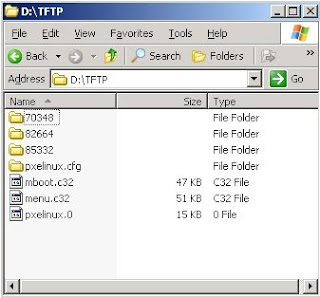
In the TFTP root pictured above I have 3 directories named after the ESXi build. The 'default' file in the pxelinx.cfg directory presents a menu so I can select which kernel to boot. I could also have a file in the pxelinux.cfg directory named after the GUID of the client, which would allow me to specify which kernel to boot for a particular client.
If you already have RIS / WDS in your environment, things are a little less clunky... can simply create a machine account in AD, enter the GUID of the box when prompted and then set the 'netbootMachineFilePath' attribute on computer object to the file on the RIS box that you want to boot.
Onto DHCP. Options 66 (TFTP server hostname) and 67 (bootfile name) need to be configured for the relevant scope. DHCP reservations for the ESXi boxen could also be considered a pre-requisite. The ESXi startup scripts do a nice job of picking that up and handling it accordingly.
So all this stuff is possible today (albeit unsupported). If ESXi doesn't have a filesystem for scratch space, it simply uses an additional 512MB of RAM for it's scratch - hardly a big overhead in comparison to the flexibility PXE gives you. Booting of an embedded USB device is cool, but having a single centralised image is way cooler. As you can see, there's nothing stopping you from keeping multiple build versions on the TFTP server, making rollbacks a snap. With this in place, you are halfway to a stateless infrastructure. New ESXi boxes can be provisioned almost as fast as they can be booted.
After booting, they need to be configured though... and that's where we move onto theory...
The biggest roadblock by far in making this truly stateless, is the lack of state management. There's no reason why VirtualCenter couldn't perform this function. But there's other stuff that would need to change too in order to support it. For example, something like the following might enable a fully functioning stateless infrastructure:
1) Move the VirtualCenter configuration store to Lightweight Directory Services (what used to be called ADAM), allowing VirtualCenter to become a federated, mutli-master application like Active Directory. The VMware Desktop Manager team are already aware that lightweght directory services make a _much_ better configuration store than SQL Server does. SQL Server would still be needed for performance data, but the recommendation for enterprises these days is to have SQL Server on a separate host anyway.
2) Enhance VirtualCenter so that you can define configurations on a cluster-wide basis. VirtualCenter would then just have to track which hosts belonged to what cluster. XenServer kind of works this way currently - as soon as you join a XenServer host to a cluster, the configurations from the other hosts are replicated to it so you don't have to do anything further on the host in order to start moving workloads onto it. This is probably the only thing XenServer does _way_ better than VI3 currently. Let's be honest - in the enterprise, the atomic unit of computing resource is the cluster these days, not the individual host. Additionally, configuration information could be further defined at a resource pool or vmfolder level.
3) Use SRV records to allow clients to locate VirtualCenter hosts (ie the Virtual Infrastructure Management service). Modify the startup process of ESXi so that it sends out a query for this SRV record everytime it boots.
4) Regardless of which VirtualCenter the ESXi box hit, since it would be federated it can tell the ESXi box which VirtualCenter host is closest to it. The ESXi box would then connect to this closest VC, and ask for configuration information.
By now all the Windows people reading this are thinking "Hmmm, something about that sounds all too familiar". And they'd be right - Windows domains work almost exactly in this way.
SRV records are used to allow clients to locate kerberos and LDAP services, ie Domain Controllers. The closest Domain Controller to the client is identified during the logon process (or from cache), and the client authenticates to this Domain Controller and pulls down configuration information (ie user profile and homedrive paths, group membership information for the user and machine accounts, Group Policy, logon scripts etc). This information is then applied during the logon process, resulting in the user receiving a fully configured environment by the time they logon.
I haven't had enough of a chance to run SCVMM 2008 and Hyper-V through their paces to see if they operate in this manner. If they don't, VMware can consider themselves lucky and would do well to get this functionality into the managment layer ASAP (even if it means releasing yet another product with "Manager" in the title :-).
If Microsoft have implmented this kind of functionality however, VMware needs to take notice and respond quickly. Given that the management layer will become more and more important as virtualisation moves into hardware, VMware can't afford to slip on this front.
Congratulations if you made it this far. Hopefully you've enjoyed reading and as always for this kind of post, comments are open!
I've mused several times on the whole stateless thing, especially with regards to ESXi, today I'm going to take it a bit further in the hope that someone out there from VMware may actually be reading (besides JT from Communities :-).
Previously I've showed how you can PXE boot ESXi. While completely unsupported, it at least lends itself to some interesting possibilities, as with ESXi, VMware are uniquely positioned to offer such a capability. The Xen hypervisor may be 50,000 lines of code but it's useless without that bloated Dom0 sitting on top of it. Check out the video (if you can be bothered to register, are they so desparate for sales leads that you need to register to watch a video???) of the XenServer "embedded" product - it still requires going though what is essentially a full Linux install, except instead of reading from a CD and installing to a hard drive it's all on a flash device attached the mainboard. But i digress...
So lets start at the top, and take a stroll through how you might string this ESXi stateless infrastructure together in your everyday enterprise. And I'll say upfront, I'm a Microsoft guy so a lot of the options in here are Microsoft centric. In my defense however, every enterprise runs Active Directory and it's easy to leverage some peripheral Windows technologies for what we want to achieve.
First up, the TFTP server. RIS (or WDS) is not entirely necessary for what we want to do - a simple ol TFTP server will do, even the one you can freely install from a Windows CD. In this example we'll use good ol' pxelinux, so our bootfilename will be 'pxelinux.0' and that file will be in the root of the TFTP server. The directory structure TFTP root could be something as follows:

In the TFTP root pictured above I have 3 directories named after the ESXi build. The 'default' file in the pxelinx.cfg directory presents a menu so I can select which kernel to boot. I could also have a file in the pxelinux.cfg directory named after the GUID of the client, which would allow me to specify which kernel to boot for a particular client.
If you already have RIS / WDS in your environment, things are a little less clunky... can simply create a machine account in AD, enter the GUID of the box when prompted and then set the 'netbootMachineFilePath' attribute on computer object to the file on the RIS box that you want to boot.
Onto DHCP. Options 66 (TFTP server hostname) and 67 (bootfile name) need to be configured for the relevant scope. DHCP reservations for the ESXi boxen could also be considered a pre-requisite. The ESXi startup scripts do a nice job of picking that up and handling it accordingly.
So all this stuff is possible today (albeit unsupported). If ESXi doesn't have a filesystem for scratch space, it simply uses an additional 512MB of RAM for it's scratch - hardly a big overhead in comparison to the flexibility PXE gives you. Booting of an embedded USB device is cool, but having a single centralised image is way cooler. As you can see, there's nothing stopping you from keeping multiple build versions on the TFTP server, making rollbacks a snap. With this in place, you are halfway to a stateless infrastructure. New ESXi boxes can be provisioned almost as fast as they can be booted.
After booting, they need to be configured though... and that's where we move onto theory...
The biggest roadblock by far in making this truly stateless, is the lack of state management. There's no reason why VirtualCenter couldn't perform this function. But there's other stuff that would need to change too in order to support it. For example, something like the following might enable a fully functioning stateless infrastructure:
1) Move the VirtualCenter configuration store to Lightweight Directory Services (what used to be called ADAM), allowing VirtualCenter to become a federated, mutli-master application like Active Directory. The VMware Desktop Manager team are already aware that lightweght directory services make a _much_ better configuration store than SQL Server does. SQL Server would still be needed for performance data, but the recommendation for enterprises these days is to have SQL Server on a separate host anyway.
2) Enhance VirtualCenter so that you can define configurations on a cluster-wide basis. VirtualCenter would then just have to track which hosts belonged to what cluster. XenServer kind of works this way currently - as soon as you join a XenServer host to a cluster, the configurations from the other hosts are replicated to it so you don't have to do anything further on the host in order to start moving workloads onto it. This is probably the only thing XenServer does _way_ better than VI3 currently. Let's be honest - in the enterprise, the atomic unit of computing resource is the cluster these days, not the individual host. Additionally, configuration information could be further defined at a resource pool or vmfolder level.
3) Use SRV records to allow clients to locate VirtualCenter hosts (ie the Virtual Infrastructure Management service). Modify the startup process of ESXi so that it sends out a query for this SRV record everytime it boots.
4) Regardless of which VirtualCenter the ESXi box hit, since it would be federated it can tell the ESXi box which VirtualCenter host is closest to it. The ESXi box would then connect to this closest VC, and ask for configuration information.
By now all the Windows people reading this are thinking "Hmmm, something about that sounds all too familiar". And they'd be right - Windows domains work almost exactly in this way.
SRV records are used to allow clients to locate kerberos and LDAP services, ie Domain Controllers. The closest Domain Controller to the client is identified during the logon process (or from cache), and the client authenticates to this Domain Controller and pulls down configuration information (ie user profile and homedrive paths, group membership information for the user and machine accounts, Group Policy, logon scripts etc). This information is then applied during the logon process, resulting in the user receiving a fully configured environment by the time they logon.
I haven't had enough of a chance to run SCVMM 2008 and Hyper-V through their paces to see if they operate in this manner. If they don't, VMware can consider themselves lucky and would do well to get this functionality into the managment layer ASAP (even if it means releasing yet another product with "Manager" in the title :-).
If Microsoft have implmented this kind of functionality however, VMware needs to take notice and respond quickly. Given that the management layer will become more and more important as virtualisation moves into hardware, VMware can't afford to slip on this front.
Congratulations if you made it this far. Hopefully you've enjoyed reading and as always for this kind of post, comments are open!
Wednesday, 14 May 2008
Get rid of that pesky VMware Tools update notification...
I have enough issues with the "VMware Tools out of date" notification appearing in the VI client every time an ESX patch is applied... it's almost useless information, as generally there are no support issues with running the RTM version of Tools regardless of the patch level of the host.
But even more annoying is the default behaviour of the VI 3.5 version of Tools, which enables a visual notification in the systray (on Windows guests) if an update is available, which is controlled by the checkbox below:
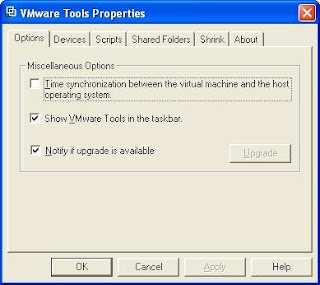
Too bad if you happen to certify particular driver (ie Tools) versions with coporate SOE versions, like every large enterprise on this planet does. And say goodbye to your standards when a bleary eyed admin sees this little yellow exclamation in the systray at 2am and gets the idea that upgrading VMware Tools may solve whatever problem they got woken up for. Hopefully they'll remember to raise a retrospective change request after some sleep. I won't even begin to imagine what the curious VDI user might do.
Fire up your registry monitoring tool of choice and clear the checkbox, and you will invariably be directed towards a modification in HKCU, meaning if you want to effect a machine wide change you would need to load the default user hive and mod the value in there, as well as the all users hive.
Good news is that you can more easily control the display on a machine wide basis by modifying the (default) value of 'HKLM\SOFTWARE\VMware, Inc.\VMware Tools'. Setting it to a DWORD value of 0 is the equivalent of clearing the checkbox (yes i know by default it's a REG_SZ - just turn it into a DWORD).
For anyone out there even half as lazy as me, copy this into your install script after the tools installer has been run:
REG ADD "HKLM\SOFTWARE\VMware, Inc.\VMware Tools" /V "" /T REG_DWORD /D "0x0" /F
But even more annoying is the default behaviour of the VI 3.5 version of Tools, which enables a visual notification in the systray (on Windows guests) if an update is available, which is controlled by the checkbox below:

Too bad if you happen to certify particular driver (ie Tools) versions with coporate SOE versions, like every large enterprise on this planet does. And say goodbye to your standards when a bleary eyed admin sees this little yellow exclamation in the systray at 2am and gets the idea that upgrading VMware Tools may solve whatever problem they got woken up for. Hopefully they'll remember to raise a retrospective change request after some sleep. I won't even begin to imagine what the curious VDI user might do.
Fire up your registry monitoring tool of choice and clear the checkbox, and you will invariably be directed towards a modification in HKCU, meaning if you want to effect a machine wide change you would need to load the default user hive and mod the value in there, as well as the all users hive.
Good news is that you can more easily control the display on a machine wide basis by modifying the (default) value of 'HKLM\SOFTWARE\VMware, Inc.\VMware Tools'. Setting it to a DWORD value of 0 is the equivalent of clearing the checkbox (yes i know by default it's a REG_SZ - just turn it into a DWORD).
For anyone out there even half as lazy as me, copy this into your install script after the tools installer has been run:
REG ADD "HKLM\SOFTWARE\VMware, Inc.\VMware Tools" /V "" /T REG_DWORD /D "0x0" /F
Tuesday, 13 May 2008
What VMware Site Recovery Manager isn't...
Straight up front - this is not a cynical post. My main point is NOT that SRM has some kind of product or design flaw. The reason for such a post is that there will be many people who will write about what SRM does offer, so I thought I'd balance it a little... to help people keep sight of the fact that it is not a panacea (not that it's purporting to be, but the marketing hyperbole is hardly going to point out why you need additional BCP / DR products). Personally I consider SRM a necessity, for the mere fact that keeping those BCP / DR VMs offline will save a fortune in system administration overheads associated with having them online, which are easily the biggest chunk of TCO. Enough of the disclaimers, onto the meat of the post!
When you think about why you would invoke a DR plan in the virtual world, it pretty much boils down to 2 things:
1) Catastrophes, like an entire datacenter or array outage.
2) Configuration errors that can't be recovered from within the application's RTO
Point 1 is obviously what SRM is designed to address, it is called Site Recovery Manager after all.
Point 2 however, is not what SRM can / should be used for, and one would certainly hope that configuration errors, like an OS or application patch that breaks something or a change request gone wrong, are much more probable than catastrophes.
Of course there are a number of ways you can address point 2. Snapshots can go some way towards it, but that can be very difficult in large enterprises where the VMware admins may not know about application changes in order to take the snap beforehand. You could schedule regular snaps and merges, effectively keeping VM's continuously in a snapshotted state, but I seem to recall something about SCSI reservations being used by VMFS to do metadata updates... stuff like extending a snapshot file when it gets written to - if you've got 20 VM's on a LUN that simultaneously kick off a virus scan which writes to a log as well as reads the entire filesystem, that might have some implications. Regular image level VCB backups could be used to similar effect, but you probably don't want to use SRM and take images of the entire virtual infrastructure. And as there's not really an elegant interface to track and manage specific VM image backups via VCB (at least not that I have seen), there's definitely room for the 3rd party tools that offer scheduled / asynchronous replication of an online production VM to an offline DR partner. If anything, it makes the need for their products more obvious.
So it's probably worth keeping the above in mind if you're coming up with a business case for putting SRM into your environment... include the need for a single VM rcovery solution as well if you don't have one already, to save getting caught out and then having to explain why that DR application you spent all that money on actually isn't the be all and end all.
When you think about why you would invoke a DR plan in the virtual world, it pretty much boils down to 2 things:
1) Catastrophes, like an entire datacenter or array outage.
2) Configuration errors that can't be recovered from within the application's RTO
Point 1 is obviously what SRM is designed to address, it is called Site Recovery Manager after all.
Point 2 however, is not what SRM can / should be used for, and one would certainly hope that configuration errors, like an OS or application patch that breaks something or a change request gone wrong, are much more probable than catastrophes.
Of course there are a number of ways you can address point 2. Snapshots can go some way towards it, but that can be very difficult in large enterprises where the VMware admins may not know about application changes in order to take the snap beforehand. You could schedule regular snaps and merges, effectively keeping VM's continuously in a snapshotted state, but I seem to recall something about SCSI reservations being used by VMFS to do metadata updates... stuff like extending a snapshot file when it gets written to - if you've got 20 VM's on a LUN that simultaneously kick off a virus scan which writes to a log as well as reads the entire filesystem, that might have some implications. Regular image level VCB backups could be used to similar effect, but you probably don't want to use SRM and take images of the entire virtual infrastructure. And as there's not really an elegant interface to track and manage specific VM image backups via VCB (at least not that I have seen), there's definitely room for the 3rd party tools that offer scheduled / asynchronous replication of an online production VM to an offline DR partner. If anything, it makes the need for their products more obvious.
So it's probably worth keeping the above in mind if you're coming up with a business case for putting SRM into your environment... include the need for a single VM rcovery solution as well if you don't have one already, to save getting caught out and then having to explain why that DR application you spent all that money on actually isn't the be all and end all.
Sunday, 20 April 2008
First Official VI Client Plug-in Document Released - round of applause for VC architects / devs!
OK, so I've been giving the VC devs a _bit_ of a hard time lately. So just to show I'm as quick to dish out praise as I am to dish out flames, I wanted to say damn good job on the VI plugin architecture!
I have been eagerly awaiting some official documentation surrounding VI plug-in development (both client and server), ever since Andrew Kutz's amazing job of reverse engineering the framework. I guess the document release probably got lost in the publicity surrounding the Virtual Disk Development Kit released a few days prior to the release of this.
Peronsally I think the whole VI plugin idea is nothing short of a stroke of genius. What better way to combat the potential for the likes of Microsoft to relegate VirtualCenter to the background by building full VMware infrastructure management into SCVMM, than to open up the VI management framework in such a way. And the architecture... as much as I might accuse VMware's tools of lacking enterprise scalability from time to time, they've absolutely nailed it this time. I mean, look at this (from the document)

Outstanding! On the coding side, it looks so straight forward that even a hacker like me should be able to put something together fairly easily... running off the example in the document, you could pretty easily add a context menu item to ESX hosts that fires up the out of band management web interface (ie the iLO page for HP kit) of that particular host.
Hopefully it won't be too long before the framework moves out of experimental status, and we start seeing 3rd party tools leverage the functionality. I've already seen the Xsigo plugin and it looks great.
Download it here
I have been eagerly awaiting some official documentation surrounding VI plug-in development (both client and server), ever since Andrew Kutz's amazing job of reverse engineering the framework. I guess the document release probably got lost in the publicity surrounding the Virtual Disk Development Kit released a few days prior to the release of this.
Peronsally I think the whole VI plugin idea is nothing short of a stroke of genius. What better way to combat the potential for the likes of Microsoft to relegate VirtualCenter to the background by building full VMware infrastructure management into SCVMM, than to open up the VI management framework in such a way. And the architecture... as much as I might accuse VMware's tools of lacking enterprise scalability from time to time, they've absolutely nailed it this time. I mean, look at this (from the document)

Outstanding! On the coding side, it looks so straight forward that even a hacker like me should be able to put something together fairly easily... running off the example in the document, you could pretty easily add a context menu item to ESX hosts that fires up the out of band management web interface (ie the iLO page for HP kit) of that particular host.
Hopefully it won't be too long before the framework moves out of experimental status, and we start seeing 3rd party tools leverage the functionality. I've already seen the Xsigo plugin and it looks great.
Download it here
Friday, 18 April 2008
VirtualCenter 2.5 Update 1 Upgrade Process - Not So Sucky After All!
EEEK! In my original post on the VC 2.5 Update 1 upgrade process, I incorrectly stated that the VC database user needs full sysadmin on the database server for the upgrade, and pondered why that was the case. Well it turns out that is entirely NOT the case at all!
Had I RTFM, I would have seen that the VC database user just needs the db_owner role on the MSDB system database, not sysadmin on the entire server. This is apparently a requirement for the SQL Agent job creation. Curiously, although the documentation states this is a requirement for a clean install as well, you only get the permissions error if you run the interactive installer. If you permission the VC database user with only the db_datareader, public and SQLAgentUser roles on the MSDB system database (I work in the finance industry - least privilege is important!) then run the installer silently, you don't get the permissions error and the SQL Agent jobs are still created!
Thanks to John over at the VMTN blog and the VMware support guys for sorting me out on that one!
Had I RTFM, I would have seen that the VC database user just needs the db_owner role on the MSDB system database, not sysadmin on the entire server. This is apparently a requirement for the SQL Agent job creation. Curiously, although the documentation states this is a requirement for a clean install as well, you only get the permissions error if you run the interactive installer. If you permission the VC database user with only the db_datareader, public and SQLAgentUser roles on the MSDB system database (I work in the finance industry - least privilege is important!) then run the installer silently, you don't get the permissions error and the SQL Agent jobs are still created!
Thanks to John over at the VMTN blog and the VMware support guys for sorting me out on that one!
Subscribe to:
Posts (Atom)