In all our anxiousness to get the statelesx 1.0.0 appliance out, we totally forgot to post up the client initiator script! So here it is:
#!/usr/bin/python
import socket
import sys
import re
#Open esx.conf, read only
esxconf = open("/etc/vmware/esx.conf", "r")
#Define regular expressions
getUUID = re.compile ("/system/uuid.=.(.*)")
#Search esx.conf for matches
for line in esxconf.readlines():
UUID = getUUID.findall(line)
for uuid in UUID:
uuid = uuid.strip('"')
#Close esx.conf
esxconf.close()
#Define statelesx server address (from argument), port and msg
host = sys.argv[1]
port = 1974
msg = uuid
#Open socket
s = socket.socket(socket.AF_INET, socket.SOCK_STREAM)
#Connect socket
s.connect((host,port))
#Send msg
print "Sending " + msg
s.send(msg)
# Close socket
s.close()
Just drop that onto your fat ESX 3.5 box and run it as one of the last startup scripts.
Sunday, 10 August 2008
Friday, 8 August 2008
VirtualCenter 2.5 Update 2 Database Changes
After my previous postings on the VirtualCenter upgrade process, I had some correspondence with VMware devs that was proxied by John Troyer from the VMTN Blog. During the course of that correspondence, I lamented the generic names given to the stats rollup SQL agent jobs. SQL agent jobs are created per-instance and thus having generic names would be problematic in a shared SQL environment - effectively, you'd need a SQL instance per VC database, instead of a single SQL instance with many VC databases. Not exactly an optimal use of resources on the SQL box.
But surprise surprise - today I installed VC 2.5 Update 2, and guess what I saw
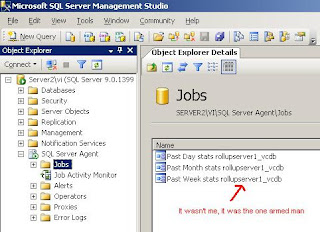
As you've probably guessed, 'server1_vcdb' is the name of my VC database. Sure, they probably meant to put a space in between 'rollup' and [databasename], but don't I feel just a little bit special ^_^. Thanks guys.
But surprise surprise - today I installed VC 2.5 Update 2, and guess what I saw

As you've probably guessed, 'server1_vcdb' is the name of my VC database. Sure, they probably meant to put a space in between 'rollup' and [databasename], but don't I feel just a little bit special ^_^. Thanks guys.
Thursday, 7 August 2008
Download statelesx 1.0.0 now!
A big thanks to all those who responded with offers of help for the hosting, the first of who was Dan Milisic over at DesktopECHO who of course has an appliance of his own! Jeff O'Connor from VMware Australia was hot on his heels with some bandwidth too, thanks for that mate :-)
Hit the download links over on the right, the details you need to know for the appliance are:
md5sum: 4e3c8b29d2069ff52afe97b910451595 statelesx-1.0.0-ovf.zip
IP Address: DHCP
Root password: root
Statelesx Web Interface: http://[IP address of appliance]/statelesxWI
statelesxWI username: statelesx
statelesxWI password: statelesx
Please send all bug reports / feature requests to vinternals@gmail.com, and for anyone in London lookout for us at the next VMware User Group meeting on August 14th!
Hit the download links over on the right, the details you need to know for the appliance are:
md5sum: 4e3c8b29d2069ff52afe97b910451595 statelesx-1.0.0-ovf.zip
IP Address: DHCP
Root password: root
Statelesx Web Interface: http://[IP address of appliance]/statelesxWI
statelesxWI username: statelesx
statelesxWI password: statelesx
Please send all bug reports / feature requests to vinternals@gmail.com, and for anyone in London lookout for us at the next VMware User Group meeting on August 14th!
Friday, 1 August 2008
Announcing Statelesx 1.0.0!
Today marks a great day for us over here... the release of our first application, Statelesx (pronounced "stateless" - think of the X in xsigo or xenophobia).
As anyone who has been reading this blog since it's inception knows, statelessness of the endpoint is something I strongly believe in. And with statelesx, you can achieve this. The architecture of the app is something like this:
1) A python script on your fat ESX boxes that runs on startup
2) A Java app that listens for requests and acts via the VirtualCenter SDK
3) A minimal web interface for managing XML cluster configuration files
In a nutshell, you create a cluster configuration file that contains cluster options (DRS,DPM,HA) and network info (vSwitches, portgroups, vmkernel interfaces) and then associate hosts to the cluster config file by their FQDN and UUID. The python script on the ESX host sends the UUID to the statelesx listener, which searches the cluster config files for a match on the UUID. If it finds one, it goes to work. If it doesn't, nothing happens.
It goes without saying, this has a lot of implications. It cuts the shit out of deployment time. It saves admins the rather boring and repetitive task of configuring esx hosts individually when new clusters hit the datacenter floor. You dont have to backup your esx configs anymore - it would be quicker to rebuild from scratch and let statelesx configure things for you. And finally, it ensures you have a 100% consistent cluster wide networking configuration.
Statelesx will be available as a virtual appliance. It runs on Ubuntu 8.04 JeOS with the Sun Java 6 package and Tomcat 6. All up the appliance is only a few hundred megs of disk, and half a gig of RAM although no doubt it could run with less if you needed it to. VI 3.5 is required, although if we get enough requests we may backport to VI 3.0.
We've put together some videos to show you it in action - be sure to watch them in full screen mode as they're recorded at 1024 x 768. The first one gives an overview and basic configuration demo. The second one goes into much more detail around the XML config files and shows an advanced configuration being applied to some hosts.
Plea for hosting!
The problem we have now, is that we dont have anywhere to host the appliance itself. Even though it zips down to under 200MB, we couldn't find any free providers that would allow the bandwidth we're hopefully going to receive when everyone realises how useful the app is :-D. So if anyone reading can help out in this regard, please contact us on vinternals at gmail dot com.
Hopefully we'll be adding a download link soon!
As anyone who has been reading this blog since it's inception knows, statelessness of the endpoint is something I strongly believe in. And with statelesx, you can achieve this. The architecture of the app is something like this:
1) A python script on your fat ESX boxes that runs on startup
2) A Java app that listens for requests and acts via the VirtualCenter SDK
3) A minimal web interface for managing XML cluster configuration files
In a nutshell, you create a cluster configuration file that contains cluster options (DRS,DPM,HA) and network info (vSwitches, portgroups, vmkernel interfaces) and then associate hosts to the cluster config file by their FQDN and UUID. The python script on the ESX host sends the UUID to the statelesx listener, which searches the cluster config files for a match on the UUID. If it finds one, it goes to work. If it doesn't, nothing happens.
It goes without saying, this has a lot of implications. It cuts the shit out of deployment time. It saves admins the rather boring and repetitive task of configuring esx hosts individually when new clusters hit the datacenter floor. You dont have to backup your esx configs anymore - it would be quicker to rebuild from scratch and let statelesx configure things for you. And finally, it ensures you have a 100% consistent cluster wide networking configuration.
Statelesx will be available as a virtual appliance. It runs on Ubuntu 8.04 JeOS with the Sun Java 6 package and Tomcat 6. All up the appliance is only a few hundred megs of disk, and half a gig of RAM although no doubt it could run with less if you needed it to. VI 3.5 is required, although if we get enough requests we may backport to VI 3.0.
We've put together some videos to show you it in action - be sure to watch them in full screen mode as they're recorded at 1024 x 768. The first one gives an overview and basic configuration demo. The second one goes into much more detail around the XML config files and shows an advanced configuration being applied to some hosts.
Plea for hosting!
The problem we have now, is that we dont have anywhere to host the appliance itself. Even though it zips down to under 200MB, we couldn't find any free providers that would allow the bandwidth we're hopefully going to receive when everyone realises how useful the app is :-D. So if anyone reading can help out in this regard, please contact us on vinternals at gmail dot com.
Hopefully we'll be adding a download link soon!
Sunday, 27 July 2008
Vinternals Doubles in Size!
Over the past few months I've been working away in the secret Vinternals coding labs on a virtual appliance with an esteemed colleague and virtualisation extraordinaire, Shyam Madhavan. What we've managed to put together is something we reckon is pretty amazing, and we hope to have something ready for you all in the next few days.
And here's the best part - it will be completely free.
After putting in such a monumental effort, it is only fair that he be rewarded with the massive fame and money that one can expect as a 50% partner in vinternals (needless to say, Shyam won't be quitting his day job). Keep your eyes peeled for some postings over the coming months / years, and be sure to check the site later in the week for more information on the appliance!
And here's the best part - it will be completely free.
After putting in such a monumental effort, it is only fair that he be rewarded with the massive fame and money that one can expect as a 50% partner in vinternals (needless to say, Shyam won't be quitting his day job). Keep your eyes peeled for some postings over the coming months / years, and be sure to check the site later in the week for more information on the appliance!
Wednesday, 23 July 2008
PowerShell - Create X Number of VM's per Datastore
We all love the 'shell, and the VI Toolkit for Windows even more. When i finish up with some other stuff, I'll surely be pointing my C# skills at some cmdlets for that.
Anyway, there are a load of "create VM" scripts out there, I thought I'd show you one with a useful twist - create a certain number of sequentially numbered VM's per datastore. For those new to the way of the 'Shell, # is a comment (unlike batch or vbscript)
There you have it. The only caveat is that the datastores don't get returned by name so if you have sequentially numbered datatstores and want the VM numbers to match (ie VM1 - VM10 on 'datastore 1', VM11 - VM20 on 'datastore 2'), you'll need to pump the datastores into an array and -sort it first or something. I'll leave the intrepid reader to handle that if required :-)
Anyway, there are a load of "create VM" scripts out there, I thought I'd show you one with a useful twist - create a certain number of sequentially numbered VM's per datastore. For those new to the way of the 'Shell, # is a comment (unlike batch or vbscript)
$esx = Get-VMHost -Name esx.host.name
$template = Get-Template -name TEMPLATE-NAME
$x = 1
#loop through all datastores on host
foreach ($d in Get-Datastore -vmhost $esx)
{
#check that it's not a local datastore
if (!($d.name -match ":"))
{
#loop to create 10 VM's per datastore
for ($i=$x; $i -lt ($x + 10); $i++)
{
#append a number to VM name
$vmname = "VM" + "$i";
#create the VM from template
New-VM -Name $vmname -Template $template -Datastore $d -Host $esx
}
#set $x to the next number in sequence for the next datastore
$x = $i
}
}
There you have it. The only caveat is that the datastores don't get returned by name so if you have sequentially numbered datatstores and want the VM numbers to match (ie VM1 - VM10 on 'datastore 1', VM11 - VM20 on 'datastore 2'), you'll need to pump the datastores into an array and -sort it first or something. I'll leave the intrepid reader to handle that if required :-)
ESXi Free by End of July!
Yes I've been quiet of late, but for a very good reason... which I'll divulge maybe on the weekend ;-)
But todays news (Alessandro - you are a machine aren't you? When do you sleep!) was just too big to let go by - ESXi is finally free. Well... finally officially free - technically it's been free for ages, all you had to was download a patch for it, as ESXi patches are essentially entire new images (although of course it would've run in eval mode for 60 days... by which time another patch would have come out ;-)
This is a great way for VMware to hit back after the raft of troubles lately. All the arguments from Microsoft, Xen, etc have always been about price, and they no longer have a leg to stand on.
This actually makes Hyper-V more expensive than ESXi, as you still have to pay for the Windows OS in the parent partition. And pay for no less than Enterprise Edition if you want to cluster Hyper-V. Lets not forget the storage add-ons if you want a clustered file system.
This puts the ball squarely back in the competition's court, and might as well be the final nail in the coffin for Citrix XenServer as it is now the only major commercial hypervisor on the market you have to pay for.
But todays news (Alessandro - you are a machine aren't you? When do you sleep!) was just too big to let go by - ESXi is finally free. Well... finally officially free - technically it's been free for ages, all you had to was download a patch for it, as ESXi patches are essentially entire new images (although of course it would've run in eval mode for 60 days... by which time another patch would have come out ;-)
This is a great way for VMware to hit back after the raft of troubles lately. All the arguments from Microsoft, Xen, etc have always been about price, and they no longer have a leg to stand on.
This actually makes Hyper-V more expensive than ESXi, as you still have to pay for the Windows OS in the parent partition. And pay for no less than Enterprise Edition if you want to cluster Hyper-V. Lets not forget the storage add-ons if you want a clustered file system.
This puts the ball squarely back in the competition's court, and might as well be the final nail in the coffin for Citrix XenServer as it is now the only major commercial hypervisor on the market you have to pay for.
Subscribe to:
Posts (Atom)