Jeez I dunno... Citrix XenDesktop 2.0, the final Hyper-V RC, the System Center Virtual Machine Manager 2008 beta, ESX guest support back in the latest Workstation 6.5 beta build... and here's me going on holiday!
Still, given the choice of checking these products out in detail or roaming around Italy, I think I'll stick with the later :-)
See y'all in a few weeks...
Tuesday, 20 May 2008
Sunday, 18 May 2008
How a stateless ESXi infrastructure might work
Yep, it's Sunday afternoon, and thus time for another installment of Sunday Afternoon Architecture and Philosophy! Advance Warning: Get your reading specs, this post is a big 'un.
I've mused several times on the whole stateless thing, especially with regards to ESXi, today I'm going to take it a bit further in the hope that someone out there from VMware may actually be reading (besides JT from Communities :-).
Previously I've showed how you can PXE boot ESXi. While completely unsupported, it at least lends itself to some interesting possibilities, as with ESXi, VMware are uniquely positioned to offer such a capability. The Xen hypervisor may be 50,000 lines of code but it's useless without that bloated Dom0 sitting on top of it. Check out the video (if you can be bothered to register, are they so desparate for sales leads that you need to register to watch a video???) of the XenServer "embedded" product - it still requires going though what is essentially a full Linux install, except instead of reading from a CD and installing to a hard drive it's all on a flash device attached the mainboard. But i digress...
So lets start at the top, and take a stroll through how you might string this ESXi stateless infrastructure together in your everyday enterprise. And I'll say upfront, I'm a Microsoft guy so a lot of the options in here are Microsoft centric. In my defense however, every enterprise runs Active Directory and it's easy to leverage some peripheral Windows technologies for what we want to achieve.
First up, the TFTP server. RIS (or WDS) is not entirely necessary for what we want to do - a simple ol TFTP server will do, even the one you can freely install from a Windows CD. In this example we'll use good ol' pxelinux, so our bootfilename will be 'pxelinux.0' and that file will be in the root of the TFTP server. The directory structure TFTP root could be something as follows:
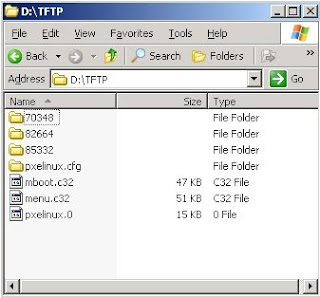
In the TFTP root pictured above I have 3 directories named after the ESXi build. The 'default' file in the pxelinx.cfg directory presents a menu so I can select which kernel to boot. I could also have a file in the pxelinux.cfg directory named after the GUID of the client, which would allow me to specify which kernel to boot for a particular client.
If you already have RIS / WDS in your environment, things are a little less clunky... can simply create a machine account in AD, enter the GUID of the box when prompted and then set the 'netbootMachineFilePath' attribute on computer object to the file on the RIS box that you want to boot.
Onto DHCP. Options 66 (TFTP server hostname) and 67 (bootfile name) need to be configured for the relevant scope. DHCP reservations for the ESXi boxen could also be considered a pre-requisite. The ESXi startup scripts do a nice job of picking that up and handling it accordingly.
So all this stuff is possible today (albeit unsupported). If ESXi doesn't have a filesystem for scratch space, it simply uses an additional 512MB of RAM for it's scratch - hardly a big overhead in comparison to the flexibility PXE gives you. Booting of an embedded USB device is cool, but having a single centralised image is way cooler. As you can see, there's nothing stopping you from keeping multiple build versions on the TFTP server, making rollbacks a snap. With this in place, you are halfway to a stateless infrastructure. New ESXi boxes can be provisioned almost as fast as they can be booted.
After booting, they need to be configured though... and that's where we move onto theory...
The biggest roadblock by far in making this truly stateless, is the lack of state management. There's no reason why VirtualCenter couldn't perform this function. But there's other stuff that would need to change too in order to support it. For example, something like the following might enable a fully functioning stateless infrastructure:
1) Move the VirtualCenter configuration store to Lightweight Directory Services (what used to be called ADAM), allowing VirtualCenter to become a federated, mutli-master application like Active Directory. The VMware Desktop Manager team are already aware that lightweght directory services make a _much_ better configuration store than SQL Server does. SQL Server would still be needed for performance data, but the recommendation for enterprises these days is to have SQL Server on a separate host anyway.
2) Enhance VirtualCenter so that you can define configurations on a cluster-wide basis. VirtualCenter would then just have to track which hosts belonged to what cluster. XenServer kind of works this way currently - as soon as you join a XenServer host to a cluster, the configurations from the other hosts are replicated to it so you don't have to do anything further on the host in order to start moving workloads onto it. This is probably the only thing XenServer does _way_ better than VI3 currently. Let's be honest - in the enterprise, the atomic unit of computing resource is the cluster these days, not the individual host. Additionally, configuration information could be further defined at a resource pool or vmfolder level.
3) Use SRV records to allow clients to locate VirtualCenter hosts (ie the Virtual Infrastructure Management service). Modify the startup process of ESXi so that it sends out a query for this SRV record everytime it boots.
4) Regardless of which VirtualCenter the ESXi box hit, since it would be federated it can tell the ESXi box which VirtualCenter host is closest to it. The ESXi box would then connect to this closest VC, and ask for configuration information.
By now all the Windows people reading this are thinking "Hmmm, something about that sounds all too familiar". And they'd be right - Windows domains work almost exactly in this way.
SRV records are used to allow clients to locate kerberos and LDAP services, ie Domain Controllers. The closest Domain Controller to the client is identified during the logon process (or from cache), and the client authenticates to this Domain Controller and pulls down configuration information (ie user profile and homedrive paths, group membership information for the user and machine accounts, Group Policy, logon scripts etc). This information is then applied during the logon process, resulting in the user receiving a fully configured environment by the time they logon.
I haven't had enough of a chance to run SCVMM 2008 and Hyper-V through their paces to see if they operate in this manner. If they don't, VMware can consider themselves lucky and would do well to get this functionality into the managment layer ASAP (even if it means releasing yet another product with "Manager" in the title :-).
If Microsoft have implmented this kind of functionality however, VMware needs to take notice and respond quickly. Given that the management layer will become more and more important as virtualisation moves into hardware, VMware can't afford to slip on this front.
Congratulations if you made it this far. Hopefully you've enjoyed reading and as always for this kind of post, comments are open!
I've mused several times on the whole stateless thing, especially with regards to ESXi, today I'm going to take it a bit further in the hope that someone out there from VMware may actually be reading (besides JT from Communities :-).
Previously I've showed how you can PXE boot ESXi. While completely unsupported, it at least lends itself to some interesting possibilities, as with ESXi, VMware are uniquely positioned to offer such a capability. The Xen hypervisor may be 50,000 lines of code but it's useless without that bloated Dom0 sitting on top of it. Check out the video (if you can be bothered to register, are they so desparate for sales leads that you need to register to watch a video???) of the XenServer "embedded" product - it still requires going though what is essentially a full Linux install, except instead of reading from a CD and installing to a hard drive it's all on a flash device attached the mainboard. But i digress...
So lets start at the top, and take a stroll through how you might string this ESXi stateless infrastructure together in your everyday enterprise. And I'll say upfront, I'm a Microsoft guy so a lot of the options in here are Microsoft centric. In my defense however, every enterprise runs Active Directory and it's easy to leverage some peripheral Windows technologies for what we want to achieve.
First up, the TFTP server. RIS (or WDS) is not entirely necessary for what we want to do - a simple ol TFTP server will do, even the one you can freely install from a Windows CD. In this example we'll use good ol' pxelinux, so our bootfilename will be 'pxelinux.0' and that file will be in the root of the TFTP server. The directory structure TFTP root could be something as follows:

In the TFTP root pictured above I have 3 directories named after the ESXi build. The 'default' file in the pxelinx.cfg directory presents a menu so I can select which kernel to boot. I could also have a file in the pxelinux.cfg directory named after the GUID of the client, which would allow me to specify which kernel to boot for a particular client.
If you already have RIS / WDS in your environment, things are a little less clunky... can simply create a machine account in AD, enter the GUID of the box when prompted and then set the 'netbootMachineFilePath' attribute on computer object to the file on the RIS box that you want to boot.
Onto DHCP. Options 66 (TFTP server hostname) and 67 (bootfile name) need to be configured for the relevant scope. DHCP reservations for the ESXi boxen could also be considered a pre-requisite. The ESXi startup scripts do a nice job of picking that up and handling it accordingly.
So all this stuff is possible today (albeit unsupported). If ESXi doesn't have a filesystem for scratch space, it simply uses an additional 512MB of RAM for it's scratch - hardly a big overhead in comparison to the flexibility PXE gives you. Booting of an embedded USB device is cool, but having a single centralised image is way cooler. As you can see, there's nothing stopping you from keeping multiple build versions on the TFTP server, making rollbacks a snap. With this in place, you are halfway to a stateless infrastructure. New ESXi boxes can be provisioned almost as fast as they can be booted.
After booting, they need to be configured though... and that's where we move onto theory...
The biggest roadblock by far in making this truly stateless, is the lack of state management. There's no reason why VirtualCenter couldn't perform this function. But there's other stuff that would need to change too in order to support it. For example, something like the following might enable a fully functioning stateless infrastructure:
1) Move the VirtualCenter configuration store to Lightweight Directory Services (what used to be called ADAM), allowing VirtualCenter to become a federated, mutli-master application like Active Directory. The VMware Desktop Manager team are already aware that lightweght directory services make a _much_ better configuration store than SQL Server does. SQL Server would still be needed for performance data, but the recommendation for enterprises these days is to have SQL Server on a separate host anyway.
2) Enhance VirtualCenter so that you can define configurations on a cluster-wide basis. VirtualCenter would then just have to track which hosts belonged to what cluster. XenServer kind of works this way currently - as soon as you join a XenServer host to a cluster, the configurations from the other hosts are replicated to it so you don't have to do anything further on the host in order to start moving workloads onto it. This is probably the only thing XenServer does _way_ better than VI3 currently. Let's be honest - in the enterprise, the atomic unit of computing resource is the cluster these days, not the individual host. Additionally, configuration information could be further defined at a resource pool or vmfolder level.
3) Use SRV records to allow clients to locate VirtualCenter hosts (ie the Virtual Infrastructure Management service). Modify the startup process of ESXi so that it sends out a query for this SRV record everytime it boots.
4) Regardless of which VirtualCenter the ESXi box hit, since it would be federated it can tell the ESXi box which VirtualCenter host is closest to it. The ESXi box would then connect to this closest VC, and ask for configuration information.
By now all the Windows people reading this are thinking "Hmmm, something about that sounds all too familiar". And they'd be right - Windows domains work almost exactly in this way.
SRV records are used to allow clients to locate kerberos and LDAP services, ie Domain Controllers. The closest Domain Controller to the client is identified during the logon process (or from cache), and the client authenticates to this Domain Controller and pulls down configuration information (ie user profile and homedrive paths, group membership information for the user and machine accounts, Group Policy, logon scripts etc). This information is then applied during the logon process, resulting in the user receiving a fully configured environment by the time they logon.
I haven't had enough of a chance to run SCVMM 2008 and Hyper-V through their paces to see if they operate in this manner. If they don't, VMware can consider themselves lucky and would do well to get this functionality into the managment layer ASAP (even if it means releasing yet another product with "Manager" in the title :-).
If Microsoft have implmented this kind of functionality however, VMware needs to take notice and respond quickly. Given that the management layer will become more and more important as virtualisation moves into hardware, VMware can't afford to slip on this front.
Congratulations if you made it this far. Hopefully you've enjoyed reading and as always for this kind of post, comments are open!
Wednesday, 14 May 2008
Get rid of that pesky VMware Tools update notification...
I have enough issues with the "VMware Tools out of date" notification appearing in the VI client every time an ESX patch is applied... it's almost useless information, as generally there are no support issues with running the RTM version of Tools regardless of the patch level of the host.
But even more annoying is the default behaviour of the VI 3.5 version of Tools, which enables a visual notification in the systray (on Windows guests) if an update is available, which is controlled by the checkbox below:
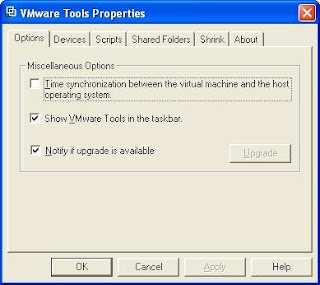
Too bad if you happen to certify particular driver (ie Tools) versions with coporate SOE versions, like every large enterprise on this planet does. And say goodbye to your standards when a bleary eyed admin sees this little yellow exclamation in the systray at 2am and gets the idea that upgrading VMware Tools may solve whatever problem they got woken up for. Hopefully they'll remember to raise a retrospective change request after some sleep. I won't even begin to imagine what the curious VDI user might do.
Fire up your registry monitoring tool of choice and clear the checkbox, and you will invariably be directed towards a modification in HKCU, meaning if you want to effect a machine wide change you would need to load the default user hive and mod the value in there, as well as the all users hive.
Good news is that you can more easily control the display on a machine wide basis by modifying the (default) value of 'HKLM\SOFTWARE\VMware, Inc.\VMware Tools'. Setting it to a DWORD value of 0 is the equivalent of clearing the checkbox (yes i know by default it's a REG_SZ - just turn it into a DWORD).
For anyone out there even half as lazy as me, copy this into your install script after the tools installer has been run:
REG ADD "HKLM\SOFTWARE\VMware, Inc.\VMware Tools" /V "" /T REG_DWORD /D "0x0" /F
But even more annoying is the default behaviour of the VI 3.5 version of Tools, which enables a visual notification in the systray (on Windows guests) if an update is available, which is controlled by the checkbox below:

Too bad if you happen to certify particular driver (ie Tools) versions with coporate SOE versions, like every large enterprise on this planet does. And say goodbye to your standards when a bleary eyed admin sees this little yellow exclamation in the systray at 2am and gets the idea that upgrading VMware Tools may solve whatever problem they got woken up for. Hopefully they'll remember to raise a retrospective change request after some sleep. I won't even begin to imagine what the curious VDI user might do.
Fire up your registry monitoring tool of choice and clear the checkbox, and you will invariably be directed towards a modification in HKCU, meaning if you want to effect a machine wide change you would need to load the default user hive and mod the value in there, as well as the all users hive.
Good news is that you can more easily control the display on a machine wide basis by modifying the (default) value of 'HKLM\SOFTWARE\VMware, Inc.\VMware Tools'. Setting it to a DWORD value of 0 is the equivalent of clearing the checkbox (yes i know by default it's a REG_SZ - just turn it into a DWORD).
For anyone out there even half as lazy as me, copy this into your install script after the tools installer has been run:
REG ADD "HKLM\SOFTWARE\VMware, Inc.\VMware Tools" /V "" /T REG_DWORD /D "0x0" /F
Tuesday, 13 May 2008
What VMware Site Recovery Manager isn't...
Straight up front - this is not a cynical post. My main point is NOT that SRM has some kind of product or design flaw. The reason for such a post is that there will be many people who will write about what SRM does offer, so I thought I'd balance it a little... to help people keep sight of the fact that it is not a panacea (not that it's purporting to be, but the marketing hyperbole is hardly going to point out why you need additional BCP / DR products). Personally I consider SRM a necessity, for the mere fact that keeping those BCP / DR VMs offline will save a fortune in system administration overheads associated with having them online, which are easily the biggest chunk of TCO. Enough of the disclaimers, onto the meat of the post!
When you think about why you would invoke a DR plan in the virtual world, it pretty much boils down to 2 things:
1) Catastrophes, like an entire datacenter or array outage.
2) Configuration errors that can't be recovered from within the application's RTO
Point 1 is obviously what SRM is designed to address, it is called Site Recovery Manager after all.
Point 2 however, is not what SRM can / should be used for, and one would certainly hope that configuration errors, like an OS or application patch that breaks something or a change request gone wrong, are much more probable than catastrophes.
Of course there are a number of ways you can address point 2. Snapshots can go some way towards it, but that can be very difficult in large enterprises where the VMware admins may not know about application changes in order to take the snap beforehand. You could schedule regular snaps and merges, effectively keeping VM's continuously in a snapshotted state, but I seem to recall something about SCSI reservations being used by VMFS to do metadata updates... stuff like extending a snapshot file when it gets written to - if you've got 20 VM's on a LUN that simultaneously kick off a virus scan which writes to a log as well as reads the entire filesystem, that might have some implications. Regular image level VCB backups could be used to similar effect, but you probably don't want to use SRM and take images of the entire virtual infrastructure. And as there's not really an elegant interface to track and manage specific VM image backups via VCB (at least not that I have seen), there's definitely room for the 3rd party tools that offer scheduled / asynchronous replication of an online production VM to an offline DR partner. If anything, it makes the need for their products more obvious.
So it's probably worth keeping the above in mind if you're coming up with a business case for putting SRM into your environment... include the need for a single VM rcovery solution as well if you don't have one already, to save getting caught out and then having to explain why that DR application you spent all that money on actually isn't the be all and end all.
When you think about why you would invoke a DR plan in the virtual world, it pretty much boils down to 2 things:
1) Catastrophes, like an entire datacenter or array outage.
2) Configuration errors that can't be recovered from within the application's RTO
Point 1 is obviously what SRM is designed to address, it is called Site Recovery Manager after all.
Point 2 however, is not what SRM can / should be used for, and one would certainly hope that configuration errors, like an OS or application patch that breaks something or a change request gone wrong, are much more probable than catastrophes.
Of course there are a number of ways you can address point 2. Snapshots can go some way towards it, but that can be very difficult in large enterprises where the VMware admins may not know about application changes in order to take the snap beforehand. You could schedule regular snaps and merges, effectively keeping VM's continuously in a snapshotted state, but I seem to recall something about SCSI reservations being used by VMFS to do metadata updates... stuff like extending a snapshot file when it gets written to - if you've got 20 VM's on a LUN that simultaneously kick off a virus scan which writes to a log as well as reads the entire filesystem, that might have some implications. Regular image level VCB backups could be used to similar effect, but you probably don't want to use SRM and take images of the entire virtual infrastructure. And as there's not really an elegant interface to track and manage specific VM image backups via VCB (at least not that I have seen), there's definitely room for the 3rd party tools that offer scheduled / asynchronous replication of an online production VM to an offline DR partner. If anything, it makes the need for their products more obvious.
So it's probably worth keeping the above in mind if you're coming up with a business case for putting SRM into your environment... include the need for a single VM rcovery solution as well if you don't have one already, to save getting caught out and then having to explain why that DR application you spent all that money on actually isn't the be all and end all.
Sunday, 27 April 2008
SAAAP!? VDI - Why is Storage Such an Issue?
A rather contentious title for a post, but there are a few things on the storage front that have been bugging me lately. The body of this post will probably have very little to do with storage, just bear with me on this little derailed train of thought.
The most common thing we see around the interwebs lately on the storage front all seem to be targeted at this issue of the storage cost with VDI. Single instancing, de-duplication, linked cloning, disk streaming... you all know what I'm talking about. But is this storage issue best solved by the storage vendors?
Maintaining state on the endpoints is the reason why we need so much storage for VDI. Even with some jedi mind trickery on the storage side to reduce duplicate OS files, there's still the applications. Which could be addressed to a similar degree with the same tricks and some kind of de-duplication, but I honestly don't think the technology is there yet. Not when Microsoft is releasing security patches on a monthly basis. The de-dup functionality from the likes of NetApp is way cool no doubt, but it's a post-processing operation. And while it may be pure philosophy on my part, I just can't see that approach scaling too well - prevention is better than cure, after all. And while de-dup via post processing is certainly a more viable option than what is currently available in a pre-processing engine, all I can say is keep an eye on that space.
Another kind of de-dup I'm sure we'll see bandied about more is Citrix Provisioning Server, the rebranded Ardence product. But again, while very, very cool, it's not very practical currently due to the non-persistence of the cache. One reboot and you're back to square 1 - which is great for a grid compute farm, but not so great for VDI.
Application virtualisation obviously goes a long way towards solving this problem. VMware knows this, otherwise the Thinstall acquisition wouldn't make much sense. With app virtualisation and presentation virtualisation and we're finally starting to address the storage problem. But a major piece is still missing - environment virtualisation.
Environment virtualisation is something that people in the presentation virtualisation (read:Citrix folk) space are very familiar with. I'm not talking about simple profile redirection or mandatory profiles - I'm talking about real environment virtualisation. The kind of thing that allows you to logon to a desktop, fire up Excel, then logon to a VDI machine on the other side of the world and open Excel on that, then fire up another Excel session from a presentation server in New York, and then another one from a presentation server in Sydney, and have all your application preferences individually delivered and saved accordingly. The kind of technology that streams your profile to wherever it needs to go. Mark it for replication around the globe or don't - the choice is yours.
Which leads me inexorably back to the title of this post. Why is storage such an issue for VDI? If the endpoint was stateless, would this issue still exist? In such a world, could we use, dare I say it, local storage on a large scale? Does this have greater implications - with a fully virtualised (machine, app, and environment) stack, could Microsoft finally have a leg to stand on with the "Quick Migration vs VMotion" debate? Comments are open - what do you think?
NOTE: I changed the title of this post after finishing it and realising the original title was just plain wrong. So apologies if you came here via an RSS feed!
The most common thing we see around the interwebs lately on the storage front all seem to be targeted at this issue of the storage cost with VDI. Single instancing, de-duplication, linked cloning, disk streaming... you all know what I'm talking about. But is this storage issue best solved by the storage vendors?
Maintaining state on the endpoints is the reason why we need so much storage for VDI. Even with some jedi mind trickery on the storage side to reduce duplicate OS files, there's still the applications. Which could be addressed to a similar degree with the same tricks and some kind of de-duplication, but I honestly don't think the technology is there yet. Not when Microsoft is releasing security patches on a monthly basis. The de-dup functionality from the likes of NetApp is way cool no doubt, but it's a post-processing operation. And while it may be pure philosophy on my part, I just can't see that approach scaling too well - prevention is better than cure, after all. And while de-dup via post processing is certainly a more viable option than what is currently available in a pre-processing engine, all I can say is keep an eye on that space.
Another kind of de-dup I'm sure we'll see bandied about more is Citrix Provisioning Server, the rebranded Ardence product. But again, while very, very cool, it's not very practical currently due to the non-persistence of the cache. One reboot and you're back to square 1 - which is great for a grid compute farm, but not so great for VDI.
Application virtualisation obviously goes a long way towards solving this problem. VMware knows this, otherwise the Thinstall acquisition wouldn't make much sense. With app virtualisation and presentation virtualisation and we're finally starting to address the storage problem. But a major piece is still missing - environment virtualisation.
Environment virtualisation is something that people in the presentation virtualisation (read:Citrix folk) space are very familiar with. I'm not talking about simple profile redirection or mandatory profiles - I'm talking about real environment virtualisation. The kind of thing that allows you to logon to a desktop, fire up Excel, then logon to a VDI machine on the other side of the world and open Excel on that, then fire up another Excel session from a presentation server in New York, and then another one from a presentation server in Sydney, and have all your application preferences individually delivered and saved accordingly. The kind of technology that streams your profile to wherever it needs to go. Mark it for replication around the globe or don't - the choice is yours.
Which leads me inexorably back to the title of this post. Why is storage such an issue for VDI? If the endpoint was stateless, would this issue still exist? In such a world, could we use, dare I say it, local storage on a large scale? Does this have greater implications - with a fully virtualised (machine, app, and environment) stack, could Microsoft finally have a leg to stand on with the "Quick Migration vs VMotion" debate? Comments are open - what do you think?
NOTE: I changed the title of this post after finishing it and realising the original title was just plain wrong. So apologies if you came here via an RSS feed!
SAAAP!? //Sunday Afternoon Architecture And Philosophy
I really wanted to keep this blog strictly technical, but alas I'm going to have to indulge in some ranting philosophy on at most a weekly basis. Hence a new post category, which is a rather poor wordplay on the abbreviated form of "what's up". I couldn't think of anything classier unfortunately.
But with a GTA IV PS3 pack on the way to my place next week and GT5 and MGS4 only a few months away, I'm sure this little excursion won't be too painful for you all - I'll probably be lucky to get something out once a month!
But with a GTA IV PS3 pack on the way to my place next week and GT5 and MGS4 only a few months away, I'm sure this little excursion won't be too painful for you all - I'll probably be lucky to get something out once a month!
Sunday, 20 April 2008
First Official VI Client Plug-in Document Released - round of applause for VC architects / devs!
OK, so I've been giving the VC devs a _bit_ of a hard time lately. So just to show I'm as quick to dish out praise as I am to dish out flames, I wanted to say damn good job on the VI plugin architecture!
I have been eagerly awaiting some official documentation surrounding VI plug-in development (both client and server), ever since Andrew Kutz's amazing job of reverse engineering the framework. I guess the document release probably got lost in the publicity surrounding the Virtual Disk Development Kit released a few days prior to the release of this.
Peronsally I think the whole VI plugin idea is nothing short of a stroke of genius. What better way to combat the potential for the likes of Microsoft to relegate VirtualCenter to the background by building full VMware infrastructure management into SCVMM, than to open up the VI management framework in such a way. And the architecture... as much as I might accuse VMware's tools of lacking enterprise scalability from time to time, they've absolutely nailed it this time. I mean, look at this (from the document)

Outstanding! On the coding side, it looks so straight forward that even a hacker like me should be able to put something together fairly easily... running off the example in the document, you could pretty easily add a context menu item to ESX hosts that fires up the out of band management web interface (ie the iLO page for HP kit) of that particular host.
Hopefully it won't be too long before the framework moves out of experimental status, and we start seeing 3rd party tools leverage the functionality. I've already seen the Xsigo plugin and it looks great.
Download it here
I have been eagerly awaiting some official documentation surrounding VI plug-in development (both client and server), ever since Andrew Kutz's amazing job of reverse engineering the framework. I guess the document release probably got lost in the publicity surrounding the Virtual Disk Development Kit released a few days prior to the release of this.
Peronsally I think the whole VI plugin idea is nothing short of a stroke of genius. What better way to combat the potential for the likes of Microsoft to relegate VirtualCenter to the background by building full VMware infrastructure management into SCVMM, than to open up the VI management framework in such a way. And the architecture... as much as I might accuse VMware's tools of lacking enterprise scalability from time to time, they've absolutely nailed it this time. I mean, look at this (from the document)

Outstanding! On the coding side, it looks so straight forward that even a hacker like me should be able to put something together fairly easily... running off the example in the document, you could pretty easily add a context menu item to ESX hosts that fires up the out of band management web interface (ie the iLO page for HP kit) of that particular host.
Hopefully it won't be too long before the framework moves out of experimental status, and we start seeing 3rd party tools leverage the functionality. I've already seen the Xsigo plugin and it looks great.
Download it here
Subscribe to:
Posts (Atom)